10 CÁI NGU PHẢI TRÁNH THÌ ĐỜI MỚI KHÔN

1 - Cho mấy thằng bài bạc mượn tiền. Muốn giúp nó làm lại cuộc đời Nhưng cuối cùng phải kêu nó bằng ông nội rồi suốt ngày quỳ lạy nó mà cũng chẳng lấy được đồng nào.

This is default featured slide 2 title

Go to Blogger edit html and find these sentences.Now replace these sentences with your own descriptions.This theme is Bloggerized by Lasantha Bandara - Premiumbloggertemplates.com.

This is default featured slide 3 title

Go to Blogger edit html and find these sentences.Now replace these sentences with your own descriptions.This theme is Bloggerized by Lasantha Bandara - Premiumbloggertemplates.com.

This is default featured slide 4 title

Go to Blogger edit html and find these sentences.Now replace these sentences with your own descriptions.This theme is Bloggerized by Lasantha Bandara - Premiumbloggertemplates.com.

This is default featured slide 5 title

Go to Blogger edit html and find these sentences.Now replace these sentences with your own descriptions.This theme is Bloggerized by Lasantha Bandara - Premiumbloggertemplates.com.

Thứ Năm, 3 tháng 9, 2020

Những công cụ lập trình phổ biến nhất


TOP PHẦN MỀM THIẾT KẾ WEBSITE TỐT NHẤT HIỆN NAY


Hiện nay, công nghệ thông tin đang ngày càng phát triển mạnh mẽ, đặc biệt là trong thời đại Cách mạng công nghiệp 4.0. Từ đó, website cũng phát triển hơn và được nhiều người quan tâm, sử dụng hơn, việc xây dựng website “ngày càng xịn” cũng được các doanh nghiệp, công ty đề cao hơn nhiều.

Thực tế, trên mạng internet có rất nhiều phần mềm thiết kế website, tuy nhiên để tìm được những phần mềm ưu việt, đáng tin cậy, hoạt động hiệu quả lại không hề dễ. Hiểu được điều này, ITPlus Academy tổng hợp giúp bạn 6 phần mềm thiết kế website tốt nhất hiện nay để bạn tham khảo và thử trải nghiệm.

Notepad++

Trong những phần mềm thiết kế website, cái tên đầu tiên phải kể đến đó là Notepad++. Đây là phần mềm luôn đứng vị trí số một, không nhà thiết kế website nào không biết đến phần mềm này. Nó có thể soạn thảo rất mạnh, tùy biến rất cao và hoàn toàn miễn phí bất cứ lúc nào khi bạn tải nó. Phần mềm này hỗ trợ viết code cho người dùng Windows và hỗ trợ các ngôn ngữ lập trình như: JAVA, C#, Python, Jsp,... Đối với các nhà lập trình thì đây chính là một phần mềm tiện lợi, hỗ trợ họ rất nhiều trong công việc. 

Vì là một phần mềm có mã nguồn mở nên những ai yêu thích có thể download phần mềm này tại địa chỉ: https://notepad-plus-plus.org/download/v7.3.3.html

Dreamweaver

Dù là một nhà thiết kế website chuyên nghiệp hay không chuyên bạn vẫn có thể sử dụng được Dreamweaver bởi phần mềm này có một giao diện vô cùng trực quan, sinh động, thuận lợi và dễ dàng đối với người sử dụng. Dreamweaver giúp các nhà thiết kế có thể kéo thả, viết code như tô mã màu, bổ sung thẻ tag, thanh công cụ mã...Bên cạnh đó Dreamweaver còn hỗ trợ các ngôn ngữ như PHP, ASP.NET, JSP, ASP...Có thể thấy, Dreamweaver xứng đáng là một trong những phần mềm thiết kế website hiện nay. 

Các bạn có thể download phần mềm tại địa chỉ: http://www.adobe.com/products/dreamweaver.html

PHPdesigner

Nếu bạn là một nhà thiết kế, có lẽ bạn đã nghe đến ngôn ngữ lập trình PHPdesigner. Công cụ lập trình này có một số ưu điểm là: giao diện thân thiện, dễ sử dụng đối với người dùng và nhiều tính năng như tuyệt vời, bạn có thể xem trước trang trên web trình duyệt, báo lỗi cú pháp khi lập trình với PHP, autocomplete...Hơn thế nữa khi sử dụng phần mềm này bạn có thể dễ dàng quản lý được các project của mình. Bạn đã thử phần mềm này chưa? Nếu chưa hãy thử sử dụng nó một lần. 

Các bạn có thể download phần mềm tại: http://www.mpsoftware.dk/phpdesigner.php

FIREBUG

Firebug là một phần mềm giúp người thiết kế có thể kiểm tra và chỉnh sửa các phần tử HTML, CSS của một website bất kỳ. Một sự tiện lợi không hề nhỏ đối với dân thiết kế, điều này giúp cho việc có thể xem trước kết quả và có thể hiểu rõ các hoạt động của ngôn ngữ nhanh chóng. Một điều tuyệt vời nữa đó là phần mềm này hoàn toàn miễn phí và tất nhiên việc cài đặt cũng hết sức đơn giản. 
Các bạn có thể download phần mềm này tại https://addons.mozilla.org/vi/firefox/addon/firebug/

E-Texteditor

Đến với phần mềm E-Texteditor, các bạn có thể viết html một cách dễ dàng nhờ việc có thể view trực tiếp được trên màn hình. Bên cạnh đó phần mềm còn hỗ trợ các ngôn ngữ mạnh như javascript, php, xml...và một số tính năng khác. Có thể thấy, phần mềm này viết html một cách vô cùng tốt. Tuy nhiên, đây lại là một phần mềm tính phí nên khi sử dụng phần mềm này các bạn phải cân nhắc về việc sử dụng phần mềm trong thời gian bao lâu. 
Các bạn có thể download phần mềm này tại https://e-texteditor.en.softonic.com/

NetBeans

Bên cạnh các phần mềm thiết kế website tốt không thể không kể đến NetBeans, một phần mềm thiết kế website mạnh mẽ. NetBeans có một số phức tạp trong thời gian đầu vì phần mềm không được thường dùng trong cùng một cách mà các biên tập viên trang web làm. Nhưng sau khi đã quen với nó thì việc thiết kế đối với bạn sẽ chỉ rất đơn giản và cảm thấy nó thật tuyệt vời. 
Các bạn có thể download phần mềm này tại https://netbeans.org/

Trên đây là 6 gợi ý tuyệt hảo nhất cho bạn nếu bạn đang muốn đi theo con đường thiết kế website. Để trở thành một nhà lập trình giỏi, bạn cần chọn cho mình phần mềm thích hợp và quan trọng là mình phải hiểu rõ nhất.

Chúc bạn thành công!

Hiện nay có rất nhiều khóa học lập trình dành cho người mới bắt đầu với chi phí rất rẻ nhưng mang lại hiệu quả tốt. Tham khảo một số khóa học:

Komodo Edit

Có hai phiên bản Komodo: Komodo Edit và Komodo IDE. Nó là mã nguồn mở và miễn phí để tải về. Nó là một bản sao được cắt bớt cho IDE.

Komodo Edit bao gồm rất nhiều tính năng tuyệt vời để phát triển HTML và CSS. Ngoài ra, bạn có thể nhận tiện ích mở rộng để thêm hỗ trợ ngôn ngữ hoặc các tính năng hữu ích khác như các ký tự đặc biệt.

Komodo không phải trình soạn thảo HTML tốt nhất, nhưng miễn phí và đặc biệt là nếu bạn xây dựng bằng XML thì nó thực sự vượt trội.

Ưu điểm Komodo Edit

  • Mở rộng thông qua các plugin. 
  • Giao diện dễ dàng tùy biến.
  • Có sẵn cho Windows, Mac và Linux. 
  • Tuyệt vời cho chỉnh sửa XML.

Nhược điểm

  • Không có trình soạn thảo WYSIWYG. 
  • Không phải là IDE tốt nhất cho người mới bắt đầu học HTML.

Eclipse

Eclipse là một môi trường phát triển phức tạp, hoàn hảo cho những người thực hiện nhiều mã hóa trên các nền tảng khác nhau và với các ngôn ngữ khác nhau. Nó được cấu trúc như các plugin mở rộng, vì vậy nếu bạn cần chỉnh sửa một cái gì đó, bạn chỉ cần tìm gói plugin thích hợp và bắt đầu sử dụng.

Nếu bạn đang tạo các ứng dụng web phức tạp, Eclipse có rất nhiều tính năng để giúp làm cho ứng dụng dễ xây dựng hơn. Nó cung cấp các plugin Java , JavaScript và PHP, cũng như một plugin cho các nhà phát triển di động.

Ưu điểm Eclipse

  • Thiết kế plugin giúp thêm ngôn ngữ mới đơn giản. 
  • Nguồn mở với cộng đồng lớn giúp giải quyết vấn đề dễ dàng hơn.

Nhược điểm:

  • Một chương trình lớn không nhẹ như các biên tập viên khác. 
  • Tiêu thụ tài nguyên hệ thống đáng kể, đặc biệt là trên các dự án lớn.

Aptana Studio 3

Phần mềm Aptana Studio 3

Aptana Studio 3 cung cấp một sự thú vị về phát triển trang web. Thay vì tập trung vào HTML, Aptana tập trung vào JavaScript và các yếu tố khác cho phép bạn tạo các ứng dụng internet phong phú. Điều đó có thể không làm cho nó phù hợp nhất cho các nhu cầu thiết kế web đơn giản, nhưng nếu ta đang tìm kiếm nhiều hơn về cách phát triển ứng dụng web, các công cụ được cung cấp trong Aptana có thể rất phù hợp.

Ưu điểm Aptana Studio 3

  • Tốt cho JavaScript. 
  • Hỗ trợ đa nền tảng (Windows, Mac, Linux). 
  • Plugin mở rộng các ngôn ngữ được hỗ trợ. 

Nhược điểm

  • Thiếu các bản cập nhật lớn trong vài năm qua. 
  • Cồng kềnh và đôi khi chậm hơn một số IDE khác.

Microsoft Visual Studio Community

Microsoft Visual Studio Community là một IDE trực quan để giúp các nhà phát triển web và các lập trình viên khác bắt đầu tạo các ứng dụng cho web, thiết bị di động và máy tính để bàn. Trước đây, bạn có thể đã sử dụng Visual Studio Express, nhưng đây là phiên bản mới nhất của phần mềm. Họ cung cấp tải xuống miễn phí, cũng như các phiên bản trả phí (bao gồm các bản dùng thử miễn phí) cho người dùng Chuyên nghiệp và Doanh nghiệp.

Ưu điểm VS

  • Được hỗ trợ tốt với các bản cập nhật và bổ sung các tính năng mới. 
  • Nhiều ngôn ngữ lập trình được hỗ trợ. 
  • Thiết kế đẹp mà thân thiện với người mới bắt đầu.

Nhược điểm

  • Các tính năng cao cấp đi kèm với thẻ giá cao. 
  • Chương trình nặng mà tiêu thụ bộ nhớ đáng kể và sức mạnh xử lý.

BlueGriffon

IDE BlueGriffon

BlueGriffon là phiên bản mới nhất trong danh sách các IDE code HTML trong bài viết này. Nó được cung cấp bởi Gecko, công cụ rending của Firefox, do đó, nó làm rất tốt việc hiển thị cách thức hoạt động trong trình duyệt tuân thủ tiêu chuẩn đó.

BlueGriffon có sẵn cho Windows, Macintosh và Linux và bằng nhiều ngôn ngữ. Đây là trình soạn thảo WYSIWYG thực sự duy nhất tạo ra danh sách này, và vì vậy nó sẽ hấp dẫn hơn đối với nhiều người mới bắt đầu và chủ doanh nghiệp nhỏ, những người muốn có một cách trực quan hơn để làm việc trái ngược với giao diện hoàn toàn tập trung vào mã.

Bluefish

Bluefish là một trình soạn thảo HTML đầy đủ tính năng chạy trên nhiều nền tảng khác nhau, bao gồm Windows, macOS và Linux.

Các tính năng đáng chú ý đã có từ phiên bản 2.0 là kiểm tra lỗi mã nhanh, tự động hoàn thành nhiều ngôn ngữ khác nhau (HTML, PHP, CSS, v.v.), đoạn trích, quản lý dự án và tự động lưu.

Bluefish chủ yếu là một trình soạn thảo mã, không cụ thể là trình soạn thảo web. Điều này có nghĩa là nó có rất nhiều tính linh hoạt cho các nhà phát triển web viết không chỉ bằng HTML, tuy nhiên, nếu bạn là nhà thiết kế tự nhiên và bạn muốn giao diện WYSIWYG tập trung vào web nhiều hơn, Bluefish có thể không dành cho bạn.

Sublime text 3

IDE Subline Text 3
IDE Subline Text 3

Sublime Text là một trình soạn thảo phát triển và soạn thảo văn bản siêu nhanh. Nếu bạn định viết mã thường xuyên, đặc biệt là ngôn ngữ HTML thì nên sử dụng công cụ này. Nó có tính năng lựa chọn phong phú các lệnh chỉnh sửa, bao gồm thụt lề hoặc không thụt lề, định dạng lại đoạn văn, nối dòng, nhiều lựa chọn, tìm kiếm và thay thế…

Phần mềm CoffeeCup Free HTML Editor
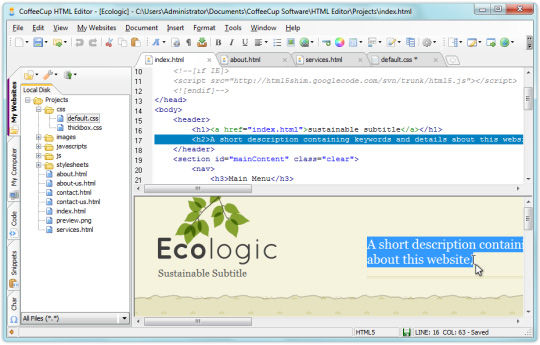
Phần mềm CoffeeCup Free HTML Editor

CoffeeCup Free HTML có hai phiên bản, phiên bản miễn phí và phiên bản đầy đủ. Phiên bản miễn phí là một công cụ tốt nhưng nó sẽ thiếu một số tính năng mà chỉ có trong phiên bản đầy đủ trả phí. CoffeeCup giờ đây cũng cung cấp bản nâng cấp có tên là Responsive Site Design hỗ trợ Responsive Web Design. Phiên bản này có thể được thêm trong gói phiên bản đầy đủ của trình chỉnh sửa này.

Một điều quan trọng cần lưu ý là nhiều trang web liệt kê công cụ soạn thảo này là trình soạn thảo WYSIWYG miễn phí (what you see is what you get - những gì bạn thấy là những gì bạn nhận được), nhưng khi thử nghiệm, nó yêu cầu mua CoffeeCup Visual Editor để nhận hỗ trợ WYSIWYG. Phiên bản miễn phí chỉ là một trình soạn thảo văn bản đơn giản và hay.

Công cụ soạn thảo văn bản này cũng như Eclipse và Komodo Edit dành cho các nhà thiết kế web. Nó đứng thứ tư vì không được các họ đánh giá cao. Tuy nhiên, nếu bạn là người mới bắt đầu thiết kế và phát triển web, hoặc là chủ doanh nghiệp nhỏ, công cụ này có nhiều tính năng phù hợp với bạn hơn là Komodo Edit hoặc Eclipse.

DownloadCoffeeCup Free HTML Editor

Phần mềm Aptana Studio

Phần mềm Aptana Studio

Aptana Studio cung cấp một sự lựa chọn thú vị về phát triển trang web. Thay vì tập trung vào HTML, Aptana tập trung vào JavaScript và các yếu tố khác cho phép bạn tạo các ứng dụng Internet phong phú. Do đó, nó có thể không phù hợp với nhu cầu thiết kế web đơn giản nhưng nếu bạn đang tìm kiếm những cách khác để phát triển ứng dụng web, thì các công cụ cung cấp trong Aptana rất phù hợp.

Tuy nhiên, một điều đáng tiếc là Aptana không được cập nhật, trang web cũng như trang Facebook và Twitter của họ thông báo phát hành phiên bản 3.6.0 vào tháng 7/2014 nhưng không có thông báo nào tiếp theo sau đó.

DownloadAptana Studio

Phần mềm Emacs Profile

Phần mềm Emacs Profile

Emacs được tìm thấy trên hầu hết các hệ thống Linux và giúp bạn dễ dàng chỉnh sửa trang ngay cả khi bạn không có phần mềm tiêu chuẩn. Emacs phức tạp hơn một số công cụ soạn thảo khác, và do đó cung cấp nhiều tính năng và khó sử dụng hơn. Các tính năng nổi bật: hỗ trợ XML, viết script, CSS nâng cao và trình kiểm tra tích hợp, cũng như chỉnh sửa HTML được mã hóa màu.

DownloadEmacs Profile

Phần mềm viết code và lập trình Vim

Địa chỉ: https://www.vim.org/

Nếu bạn tìm kiếm một phần mềm lập trình web, viết code mạnh mẽ và có thể sử dụng chung với nhiều công cụ khác nhau thì Vim chính là sự lựa chọn dành cho bạn. Các nhà lập trình viên chuyên nghiệp đánh giá Vim rất cao nhờ vào những tính năng độc đáo và ấn tượng mà nó mang lại. Phần mềm Vim cho phép người sử dụng nhúng trực tiếp và các công cụ khác nhau như Visual Studio, Eclipse,… Phần mềm cũng hỗ trợ chạy trên đa hệ điều hành, mang tới sự linh hoạt cho người sử dụng. Vim hiện đang được cung cấp miễn phí trên toàn cầu nên sẽ giúp tối ưu hóa chi phí trong công việc, mang tới lợi nhuận cao nhất cho người dùng.

phan-mem-viet-code-5


Thứ Bảy, 15 tháng 8, 2020

Lập trình viên web cần học những gì?


(Theo https://codegym.vn/blog/2019/01/04/lap-trinh-vien-web-can-hoc-nhung-gi)

Lập trình viên web cần học những gì? Hiện nay lập trình web đang là một trong những công việc được nhiều người yêu thích lập trình lựa chọn. Bởi nó không chỉ đem lại cơ hội việc làm cao mà nó còn đem lại nguồn thu nhập ổn định cho nhiều người. Nhiều người nghĩ rằng lập trình web là một công việc khô khan và khó nhằn, chắc chỉ dành cho người có năng khiếu bẩm sinh mà thôi. Thực tế thì lại không phải như vậy, hầu như ai cũng có thể học lập trình web được. Miễn là chịu học một cách kiên trì, quyết tâm thực hành, theo đuổi đến cùng. Vậy thì học lập trình web là học những gì?

Trước tiên, chúng ta nhìn cái đích mà chúng ta muốn nhắm tới để từ đó hình dung ra cách học. Chúng ta quan sát kiến trúc ứng dụng Web động phổ biến hiện nay như sau:

Lập trình viên Web cần học những gì

Theo kiến trúc này và theo góc nhìn của người lập trình thì kiến trúc ứng dụng trên sẽ chia làm Front-end và Back-end (Back End – App và Back End – Database.)

ĐĂNG KÝ NHẬN TÀI LIỆU HỌC LẬP TRÌNH MIỄN PHÍ TẠI ĐÂY

Kỹ năng Web Front-end

Front-end (mặt trước) là phần giao diện giao tiếp với người sử dụng, nó sẽ hiển thị lên trình duyệt của người dùng. Để xây dựng tốt phần này bạn phải nắm vững các kiến thức kỹ năng xây dựng liên quan đến giao diện. Cụ thể ở đây bạn cần nắm:

HTML và CSS

HTML (HyperText Markup Language) và CSS (Cascading Style Sheets) là các khối xây dựng cơ bản nhất của mã hóa web. Nếu không có HTML và CSS, bạn có thể sẽ không tạo ra một trang web. Và tất cả những gì bạn sẽ có là văn bản đơn giản không được định dạng trên màn hình. Bạn thậm chí không thể thêm hình ảnh vào một trang mà không có HTML

Trước khi bạn bắt đầu trên bất kỳ con đường sự nghiệp phát triển web nào. Bạn sẽ phải thành thạo mã hóa với HTML và CSS. Bạn có thể có kiến thức vững chắc về HTML và CSS trong một vài tuần. Tuy nhiên bạn không nên chủ quan với nó và coi nó là dễ dàng.

JavaScript

JavaScript cho phép bạn thêm nhiều chức năng vào trang web của mình. Bạn thậm chí có thể tạo rất nhiều ứng dụng web cơ bản. Bằng cách sử dụng không gì khác hơn HTML, CSS và JavaScript (viết tắt là JS). Ở cấp độ cơ bản nhất, JS cho phép bạn thêm rất nhiều yếu tố tương tác vào trang web của mình. Sử dụng nó để tạo ra những thứ như bản đồ cập nhật theo thời gian thực. Hay phim tương tác và trò chơi trực tuyến. Các trang web như Pinterest sử dụng JavaScript rất nhiều. Để làm cho giao diện người dùng của họ trở nên dễ sử dụng. Thực tế là trang không tải lại bất cứ khi nào bạn ghim một cái gì đó là nhờ JavaScript.

Đây cũng là ngôn ngữ lập trình phổ biến nhất trên thế giới, vì vậy bất kể kế hoạch nghề nghiệp của bạn là gì, đó là một điều siêu giá trị để học hỏi.

WordPress

WordPress một công cụ giúp bạn làm một trang web, blog hoặc tin tức cho riêng bạn. Và đây là một trong những CMS (phần mềm quản lý nội dung) tốt nhất bạn có thể chọn sử dụng để tạo trang web cho riêng mình.

WordPress được phát triển nhằm phục vụ đối tượng người dùng phổ thông. Không cần có quá nhiều kiến thức về lập trình hay website nâng cao. Vì các thao tác trong WordPress rất đơn giản. Giao diện quản trị trực quan, giúp bạn có thể nắm rõ cơ cấu quản lý một website WordPress trong thời gian ngắn. Nhưng WordPress cũng đủ mạnh và linh hoạt để phục vụ cho những ai đã am hiểu công nghệ. Hoặc chạy trang web cho việc kinh doanh. Nếu bạn đang muốn bắt đầu tạo lập một trang Web, hay Blog thì WordPress chính là sự lựa chọn thích hợp. Đây cũng là sự lựa chọn của hơn 25% trong mười triệu trang web hàng đầu hiện nay.

Lập trình viên web cần học những gì?

Chuyên gia Web Back-end

Ngôn ngữ lập trình Web

Back-end (mặt sau) là phần xử lý nghiệp vụ (Business Logic), nó thường được đảm nhận bởi các ngôn ngữ lập trình như Java, C#, PHP, Python, Ruby…. Việc chọn sử dụng ngôn ngữ nào phụ thuộc vào sở thích và đặc thù của ứng dụng mà bạn sẽ xây dựng.

PHP, Python, Ruby: có đặc thù gọn nhẹ, dễ học, dễ sử dụng, chạy nhanh hơn. Nhưng không phù hợp với các ứng dụng có quy mô lớn, mức độ bảo mật phức tạp.

Java, C#: Nặng hơn, phù hợp với các ứng dụng lớn, có độ phức tạp cao.

Máy chủ

Hầu hết các công việc phát triển web cấp nhập cảnh sẽ không yêu cầu bạn xây dựng máy chủ của riêng mình. Nhưng ít nhất bạn sẽ cần hiểu cách chúng hoạt động và cách trang web của bạn tương tác với chúng.

API

Bạn sẽ cần hiểu làm thế nào front-end của trang web của bạn có thể tương tác với cơ sở hạ tầng phía sau. Thông qua Giao diện lập trình ứng dụng (API).

GitHub

Khi các bạn là một lập trình web và làm việc trong một công ty lớn. bạn thường làm việc theo nhóm và thường thì bạn sẽ làm trên GitHub.

GitHub và các phiên bản khác kiểm soát các nền tảng khác của Haiti. Nó cho phép bạn cộng tác chỉnh sửa mã với đồng nghiệp (và những người khác). Trong khi vẫn duy trì tính toàn vẹn của các phiên bản trước theo thời gian.

Về Git đơn giản hơn đó là nó sẽ giúp bạn lưu lại các phiên bản của những lần thay đổi vào mã nguồn. Và có thể dễ dàng khôi phục lại mà không cần copy lại mã nguồn rồi cất vào đâu đó. Và một người khác có thể xem các thay đổi của bạn ở từng phiên bản. Họ cũng có thể đối chiếu các thay đổi của bạn rồi gộp phiên bản của bạn vào phiên bản của họ. Cuối cùng là tất cả có thể đưa các thay đổi vào mã nguồn của mình lên một kho chứa mã nguồn.

SQL và cơ sở dữ liệu

Nhiều trang web và ứng dụng web sử dụng cơ sở dữ liệu để lưu trữ thông tin. Database chịu trách nhiệm lưu trữ và truy xuất dữ liệu phát sinh từ ứng dụng. Để học về Database (chỉ xét CSDL quan hệ) bạn có thể chia làm 2 phần:

  • Ngôn ngữ truy vấn dữ liệu: SQL (Structured Query Language)
  • Hệ quản trị CSDL: MySQL, SQL Server, DB2, Oracle …

HTTPS & An ninh mạng

An ninh mạng đã trở thành một chủ đề nóng vào cuối năm 2017. Do các vụ hack cao cấp gây thiệt hại hàng tỷ đô la. Và nó khiến 145 triệu người Mỹ phải đối mặt với niềm vui của hành vi trộm cắp danh tính. Nhà tuyển dụng quan tâm đến an ninh mạng hơn bao giờ hết. Nếu bạn có thể hiển thị một sự hiểu biết cơ bản về an ninh mạng. Bạn đã vượt lên đối thủ cạnh tranh. An ninh mạng đang là một vấn đề được rất nhiều các doanh nghiệp Việt Nam quan tâm. Bởi nó ảnh hưởng trực tiếp đến chất lượng và sự phát triển của công ty.

Lập trình viên web cần học những gì?

Kỹ năng thiết kế web

Trước khi bạn bắt đầu mã hóa một trang web bạn sẽ cần phải có thiết kế tổng thể về trnag web đó. Mặc dù kỹ năng thiết kế web là nhiệm vụ của một nhà thiết kế web. Tuy nhiên để trở thành một nhà lập trình web bạn cũng nên hiểu các nguyên tắc cơ bản của một nhà thiết kế web.

Responsive & Mobile-First Design

Tất cả các nhà phát triển web muốn được tuyển dụng vào năm 2018. Bạn phải biết cách xây dựng các trang web đầu tiên trên thiết bị di động. Đáp ứng tất cả các hình dạng và kích thước màn hình. Nếu bạn xây dựng một trang web trông tuyệt vời trên màn hình máy tính để bàn HD khổng lồ của bạn. Nhưng trông giống như một đống rác trên iPhone X mới của CEO. Khách hàng của bạn sẽ không hài lòng với công việc của bạn.

Hãy cố gắng để bản thân trở thành một nhà lập trình web toàn diện. Nó sẽ giúp bạn có được nhiều cơ hội hơn trong cuộc sống. Và khi làm việc cơ hội thăng tiến của bạn cũng sẽ cao hơn những người lập trình khác.

Với những chia sẻ về lập trình web cần học những gì mong rằng các bạn sẽ có những cái nhìn tổng quan hơn về lập trình web. Chúc bạn luôn thành công.

Thứ Bảy, 8 tháng 8, 2020

URL-encodes string

Description

urlencode ( string $str ) : string

This function is convenient when encoding a string to be used in a query part of a URL, as a convenient way to pass variables to the next page.

Parameters

str The string to be encoded.

Return Values

Returns a string in which all non-alphanumeric characters except -_. have been replaced with a percent (%) sign followed by two hex digits and spaces encoded as plus (+) signs. It is encoded the same way that the posted data from a WWW form is encoded, that is the same way as in application/x-www-form-urlencoded media type. This differs from the » RFC 3986 encoding (see rawurlencode()) in that for historical reasons, spaces are encoded as plus (+) signs.

Examples

Example #1 urlencode() example

<?php
echo '<a href="mycgi?foo='urlencode($userinput), '">';
?>

Example #2 urlencode() and htmlentities() example

<?php
$query_string 
'foo=' urlencode($foo) . '&bar=' urlencode($bar);
echo 
'<a href="mycgi?' htmlentities($query_string) . '">';
?>

Notes

Note:

Be careful about variables that may match HTML entities. Things like &amp, &copy and &pound are parsed by the browser and the actual entity is used instead of the desired variable name. This is an obvious hassle that the W3C has been telling people about for years. The reference is here: » http://www.w3.org/TR/html4/appendix/notes.html#h-B.2.2.

PHP supports changing the argument separator to the W3C-suggested semi-colon through the arg_separator .ini directive. Unfortunately most user agents do not send form data in this semi-colon separated format. A more portable way around this is to use &amp; instead of & as the separator. You don't need to change PHP's arg_separator for this. Leave it as &, but simply encode your URLs using htmlentities() or htmlspecialchars().

See Also

add a note add a note

User Contributed Notes 23 notes

davis dot peixoto at gmail dot com 
10 years ago
urlencode function and rawurlencode are mostly based on RFC 1738.

However, since 2005 the current RFC in use for URIs standard is RFC 3986.

Here is a function to encode URLs according to RFC 3986.

<?php
function myUrlEncode($string) {
    
$entities = array('%21''%2A''%27''%28''%29''%3B''%3A''%40''%26''%3D''%2B''%24''%2C''%2F''%3F''%25''%23''%5B''%5D');
    
$replacements = array('!''*'"'""("")"";"":""@""&""=""+""$"",""/""?""%""#""[""]");
    return 
str_replace($entities$replacementsurlencode($string));
}
?>
admin at server dot net 
10 months ago
urlencode corresponds to the definition for application/x-www-form-urlencoded in RFC 1866 (https://tools.ietf.org/html/rfc1866#section-8.2.1), and not for url encoded parts in URI. Use only rawurlencode for encode raw URI parts (e.g. query/search part)!
temu92 at gmail dot com 
11 years ago
I needed encoding and decoding for UTF8 urls, I came up with these very simple fuctions. Hope this helps!

<?php
    
function url_encode($string){
        return 
urlencode(utf8_encode($string));
    }
   
    function 
url_decode($string){
        return 
utf8_decode(urldecode($string));
    }
?>
daniel+php at danielnorton dot com 
11 years ago
Don't use urlencode() or urldecode() if the text includes an email address, as it destroys the "+" character, a perfectly valid email address character.

Unless you're certain that you won't be encoding email addresses AND you need the readability provided by the non-standard "+" usage, instead always use use rawurlencode() or rawurldecode().
omid at omidsakhi dot com 
10 years ago
I needed a function in PHP to do the same job as the complete escape function in Javascript. It took me some time not to find it. But findaly I decided to write my own code. So just to save time:

<?php
function fullescape($in)
{
  
$out '';
  for (
$i=0;$i<strlen($in);$i++)
  {
    
$hex dechex(ord($in[$i]));
    if (
$hex=='')
       
$out $out.urlencode($in[$i]);
    else
       
$out $out .'%'.((strlen($hex)==1) ? ('0'.strtoupper($hex)):(strtoupper($hex)));
  }
  
$out str_replace('+','%20',$out);
  
$out str_replace('_','%5F',$out);
  
$out str_replace('.','%2E',$out);
  
$out str_replace('-','%2D',$out);
  return 
$out;
}
?>

It can be fully decoded using the unscape function in Javascript.
ahrensberg at gmail dot com 
13 years ago
Like "Benjamin dot Bruno at web dot de" earlier has writen, you can have problems with encode strings with special characters to flash. Benjamin write that:

<?php
   
function flash_encode ($input)
   {
      return 
rawurlencode(utf8_encode($input));
   }
?>

... could do the problem. Unfortunately flash still have problems with read some quotations, but with this one:

<?php
   
function flash_encode($string)
   {
      
$string rawurlencode(utf8_encode($string));

      
$string str_replace("%C2%96""-"$string);
      
$string str_replace("%C2%91""%27"$string);
      
$string str_replace("%C2%92""%27"$string);
      
$string str_replace("%C2%82""%27"$string);
      
$string str_replace("%C2%93""%22"$string);
      
$string str_replace("%C2%94""%22"$string);
      
$string str_replace("%C2%84""%22"$string);
      
$string str_replace("%C2%8B""%C2%AB"$string);
      
$string str_replace("%C2%9B""%C2%BB"$string);

      return 
$string;
   }
?>

... should solve this problem.
david winiecki gmail 
5 years ago
Since PHP 5.3.0, urlencode and rawurlencode also differ in that rawurlencode does not encode ~ (tilde), while urlencode does.
no_gravity 
6 months ago
I think the description does not exactly match what the function does:

    Returns a string in which all non-alphanumeric characters
    except -_. have been replaced with a percent (%) sign followed
    by two hex digits and spaces encoded as plus (+) signs.

urlencode('ö') gives me '%C3%B6'. So more then just a percent sign followed by two hex digits.
kL 
13 years ago
Apache's mod_rewrite and mod_proxy are unable to handle urlencoded URLs properly - http://issues.apache.org/bugzilla/show_bug.cgi?id=34602

If you need to use any of these modules and handle paths that contain %2F or %3A (and few other encoded special url characters), you'll have use a different encoding scheme.

My solution is to replace "%" with "'".
<?php
function urlencode($u)
{
    return 
str_replace(array("'",'%'),array('%27',"'"),urlencode($u));
}

function 
urldecode($u)
{
    return 
urldecode(strtr($u,"'",'%'));
}
?>
izhankhalib at gmail dot com 
6 years ago
Below is our jsonform source code in  mongo db which consists a lot of double quotes. we are able to pass this source code to the ajax form submit function by using php urlencode :

<script type="text/javascript">
$(function() {
      // Generate a form using jquery.dfrom
        $("#myform").dform({
                      
        "html":[
            {
                "type":"p",
                "html":"Patient Record"
            },
            {
                "name":"patient.name.first",
                "id":"txt-patient.name.first",
                "caption":"first name",
                "type":"text",
            },
            {
               
                "name":"patient.name.last",
                "id":"txt-patient.name.last",
                "caption":"last name",
                "type":"text",
            },
            {
               "type" : "submit",
              }
           
        ]
    });
    });
</script>
<form id="myform">

<?php
//get the json source code from the mongodb
$jsonformurlencode($this->data['Post']['jsonform']);

?>
//AJAX SUBMIT FORM
<script type="text/javascript">
$('#myform').submit(function(){
 
               
    //    passing the variable fro PHP to javascript   
        var thejsonform="<?php echo $jsonform ?>";

  //var fname = $('input#fname').val();
  var dataString = "jsonform=" + thejsonform ;

    $.ajax({
          type: "POST",
        //  url: "test1.php",
          data: dataString,
          success: function() {
          
          }
         });
 

return false;
});
neugey at cox dot net 
15 years ago
Be careful when encoding strings that came from simplexml in PHP 5.  If you try to urlencode a simplexml object, the script tanks.

I got around the problem by using a cast.

$newValue = urlencode( (string) $oldValue );
R Mortimer 
14 years ago
Do not let the browser auto encode an invalid URL. Not all browsers perform the same encodeing. Keep it cross browser do it server side.
frx dot apps at gmail dot com 
10 years ago
I wrote this simple function that creates a GET query (for URLS) from an array:

<?php
function encode_array($args)
{
  if(!
is_array($args)) return false;
  
$c 0;
  
$out '';
  foreach(
$args as $name => $value)
  {
    if(
$c++ != 0$out .= '&';
    
$out .= urlencode("$name").'=';
    if(
is_array($value))
    {
      
$out .= urlencode(serialize($value));
    }else{
      
$out .= urlencode("$value");
    }
  }
  return 
$out "\n";
}
?>

If there are arrays within the $args array, they will be serialized before being urlencoded.

Some examples:
<?php
echo encode_array(array('foo' => 'bar'));                    // foo=bar
echo encode_array(array('foo&bar' => 'some=weird/value'));   // foo%26bar=some%3Dweird%2Fvalue
echo encode_array(array('foo' => 1'bar' =>  'two'));       // foo=1&bar=two
echo encode_array(array('args' => array('key' => 'value'))); // args=a%3A1%3A%7Bs%3A3%3A%22key%22%3Bs%3A5%3A%22value%22%3B%7D
?>
root at jusme dot org 
11 years ago
I'm running PHP version 5.0.5 and urlencode() doesn't seem to encode the "#" character, although the function's description says it encodes "all non-alphanumeric" characters. This was a particular problem for me when trying to open local files with a "#" in the filename as Firefox will interpret this as an anchor target (for better or worse). It seems a manual str_replace is required unless this was fixed in a future PHP version.

Example:

$str = str_replace("#", "%23", $str);
youhanasobhy15 at gmail dot com 
2 years ago
Keep in mind that, if you prepare URL for a connection and used the urlencode on some parameters and didn't use it on the rest of parameters, it will not be decoded automatically at the destination position if the not encoded parameters have special characters that urlencode encodes it.

example :

$xml = simplexml_load_file("http://www.testing.com?me=test&first=".urlencode('dummy string')."&second=here is the string");

here is the second parameter has spaces which urlencode converts it to (+).

after using this URL, the server will discover that the second parameter has not been encoded , then the server will not decode it automatically.

this took more than 2 hours to be discovered and hope to save your time.
in reply to "kL" 
13 years ago
kL's example is very bugged since it loops itself and the encode function is two-way.

Why do you replace all %27 through '  in the same string in that you replace all ' through %27?

Lets say I have a string: Hello %27World%27. It's a nice day.
I get: Hello Hello 'World'. It%27s a nice day.

With other words that solution is pretty useless.

Solution:
Just replace ' through %27 when encoding
Just replace %27 through ' when decoding. Or just use url_decode.
Mark Seecof 
11 years ago
When using XMLHttpRequest or another AJAX technique to submit data to a PHP script using GET (or POST with content-type header set to 'x-www-form-urlencoded') you must urlencode your data before you upload it.  (In fact, if you don't urlencode POST data MS Internet Explorer may pop a "syntax error" dialog when you call XMLHttpRequest.send().)  But, you can't call PHP's urlencode() function in Javascript!  In fact, NO native Javascript function will urlencode data correctly for form submission.  So here is a function to do the job fairly efficiently:

<?php /******

<script type="text/javascript" language="javascript1.6">
// PHP-compatible urlencode() for Javascript
function urlencode(s) {
  s = encodeURIComponent(s);
  return s.replace(/~/g,'%7E').replace(/%20/g,'+');
}

// sample usage:  suppose form has text input fields for
// country, postcode, and city with id='country' and so-on.
// We'll use GET to send values of country and postcode
// to "city_lookup.php" asynchronously, then update city
// field in form with the reply (from database lookup)

function lookup_city() {
  var elm_country = document.getElementById('country');
  var elm_zip = document.getElementById('postcode');
  var elm_city = document.getElementById('city');
  var qry = '?country=' + urlencode(elm_country.value) +
                '&postcode=' + urlencode(elm_zip.value);
  var xhr;
  try {
   xhr = new XMLHttpRequest(); // recent browsers
  } catch (e) {
   alert('No XMLHttpRequest!');
   return;
  }
  xhr.open('GET',('city_lookup.php'+qry),true);
  xhr.onreadystatechange = function(){
    if ((xhr.readyState != 4) || (xhr.status != 200)) return;
    elm_city.value = xhr.responseText;
  }
  xhr.send(null);
}
</script>

******/ 
?>
torecs at sfe dot uio dot no 
14 years ago
This very simple function makes an valid parameters part of an URL, to me it looks like several of the other versions here are decoding wrongly as they do not convert & seperating the variables into &amp;.

  $vars=array('name' => 'tore','action' => 'sell&buy');
  echo MakeRequestUrl($vars);
 
  /* Makes an valid html request url by parsing the params array
   * @param $params The parameters to be converted into URL with key as name.
   */
  function MakeRequestUrl($params)
  {
      $querystring=null;
    foreach ($params as $name => $value)
    {
      $querystring=$name.'='.urlencode($value).'&'.$querystring;
    }
      // Cut the last '&'
      $querystring=substr($querystring,0,strlen($querystring)-1);
      return htmlentities($querystring);
  }

  Will output: action=sell%26buy&amp;name=tore
edwardzyang at thewritingpot dot com 
15 years ago
I was testing my input sanitation with some strange character entities. Ones like � and � were passed correctly and were in their raw form when I passed them through without any filtering.

However, some weird things happen when dealing with characters like (these are HTML entities): &#8252; &#9616; &#9488;and &#920; have weird things going on.

If you try to pass one in Internet Explorer, IE will *disable* the submit button. Firefox, however, does something weirder: it will convert it to it's HTML entity. It will display properly, but only when you don't convert entities.

The point? Be careful with decorative characters.

PS: If you try copy/pasting one of these characters to a TXT file, it will translate to a ?.
monty3 at hotmail dot com 
15 years ago
If you want to pass a url with parameters as a value IN a url AND through a javascript function, such as...

   <a href="javascript:openWin('page.php?url=index.php?id=4&pg=2');">

...pass the url value through the PHP urlencode() function twice, like this...

<?php

   $url 
"index.php?id=4&pg=2";
   
$url urlencode(urlencode($url));

   echo 
"<a href=\"javascript:openWin('page.php?url=$url');\">";
?>

On the page being opened by the javascript function (page.php), you only need to urldecode() once, because when javascript 'touches' the url that passes through it, it decodes the url once itself. So, just decode it once more in your PHP script to fully undo the double-encoding...

<?php

   $url 
urldecode($_GET['url']);
?>

If you don't do this, you'll find that the result url value in the target script is missing all the var=values following the ? question mark...

   index.php?id=4
bisqwit at iki dot fi 
14 years ago
Constructing hyperlinks safely HOW-TO:

<?php
$path_component 
'machine/generated/part';
$url_parameter1 'this is a string';
$url_parameter2 'special/weird "$characters"';

$url 'http://example.com/lab/cgi/test/'rawurlencode($path_component) . '?param1=' urlencode($url_parameter1) . '&param2=' urlencode($url_parameter2);

$link_label "Click here & you'll be <happy>";

echo 
'<a href="'htmlspecialchars($url), '">'htmlspecialchars($link_label), '</a>';
?>

This example covers all the encodings you need to apply in order to create URLs safely without problems with any special characters. It is stunning how many people make mistakes with this.

Shortly:
- Use urlencode for all GET parameters (things that come after each "=").
- Use rawurlencode for parts that come before "?".
- Use htmlspecialchars for HTML tag parameters and HTML text content.
nehuensd at gmail dot com 
6 years ago
if you have a url like this: test-blablabla-4>3-y-3<6 or with any excluded US-ASCII Characters (see chapter 2.4.3 on http://www.ietf.org/rfc/rfc2396.txt) you can use urlencode two times for fix the 403 error.

Example:
.htaccess
Options +FollowSymLinks
RewriteEngine on
RewriteRule ^test-(.*)$ index.php?token=$1

index.php
<?php
    var_dump
($_GET);
   
    
$foo 'test-bla-bla-4>2-y-3<6';
    
$foo_encoded urlencode(urlencode($foo));
?>
<a href="<?=$foo_encoded;?>"><?=$foo_encoded;?></a>

look on index.php
array (size=0)
  empty
test-bla-bla-4%253E2-y-3%253C6

look on test-bla-bla-4%253E2-y-3%253C6
array (size=1)
  'token' => string 'bla-bla-4>2-y-3<6' (length=17)
test-bla-bla-4%253E2-y-3%253C6

the problem is that the characters are decoded 2 times, 1 single, the first time mod_rewrite, the second is to create the php $ _GET array.

also, you can use this technique to the same as the complex functions of other notes.
homebot at yandex dot ru 
7 years ago
Simple static class for array URL encoding

[code]

<?php

/**
*
*  URL Encoding class
*  Use : urlencode_array::go() as function
*
*/
class urlencode_array
{

  
/** Main encoding worker
  * @param string $perfix
  * @param array $array
  * @param string $ret byref Push record to return array
  * @param mixed $fe Is first call to function?
  */
  
private static function encode_part($perfix$array, &$ret$fe false)
  {
    foreach ( 
$array as $k => $v )
    {
      switch ( 
gettype($v))
      {
        case 
'float'   :
        case 
'integer' :
        case 
'string'  $ret $fe $k $perfix.'['.$k.']' ] = $v; break;
        case 
'boolean' $ret $fe $k $perfix.'['.$k.']' ] = ( $v '1' '0' ); break;
        case 
'null'    $ret $fe $k $perfix.'['.$k.']' ] = 'NULL'; break;
        case 
'object'  $v = (array) $v;
        case 
'array'   self::encode_part$fe?$perfix.$k:$perfix.'['.$k.']' $v$retfalse); break;
      }
    }
  }

  
/** UrlEncode Array
  * @param mixed $array Array or stdClass to encode
  * @returns string Strings ready for send as 'application/x-www-form-urlencoded'
  */
  
public static function go($array)
  {
    
$buff = array();
    if ( 
gettype($array) == 'object'$array = (array) $array;
    
self::encode_part(''$array$bufftrue);
    
$retn '';
    foreach ( 
$buff as $k => $v )
      
$retn .= urlencode($k) . '=' urlencode($v) . '&';
    return 
$retn;
  }
}

#-------------------------------- TEST AREA ------------------------------------

$buffer = array(
  
'master'  =>'master.zenith.lv',
  
'join'    =>array('slave'=>'slave1.zenith.lv','slave2'=>array('node1.slave2.zenith.lv','slave2.zenith.lv')),
  
'config'  => new stdClass()
);
$buffer['config']->MaxServerLoad  200;
$buffer['config']->MaxSlaveLoad   100;
$buffer['config']->DropUserNoWait true;

$buffer urlencode_array::go($buffer);
parse_str$buffer $data_decoded);

header('Content-Type: text/plain; charset=utf-8');
echo 
'Encoded String :' str_repeat('-'80) . "\n";
echo 
$buffer;
echo 
str_repeat("\n"3) . 'Decoded String byPhp :' str_repeat('-'80) . "\n";
print_r($data_decoded);

[/code] 

https://docs.microsoft.com/en-us/dotnet/api/system.web.httputility.urlencode?view=netcore-3.1

Encodes a URL string. These method overloads can be used to encode the entire URL, including query-string values.

To encode or decode values outside of a web application, use the WebUtility class.

Overloads

OVERLOADS
UrlEncode(String, Encoding)

Encodes a URL string using the specified encoding object.

UrlEncode(Byte[], Int32, Int32)

Converts a byte array into a URL-encoded string, starting at the specified position in the array and continuing for the specified number of bytes.

UrlEncode(Byte[])

Converts a byte array into an encoded URL string.

UrlEncode(String)

Encodes a URL string.

UrlEncode(String, Encoding)

Encodes a URL string using the specified encoding object.

C#
public static string UrlEncode (string str, System.Text.Encoding e);

Parameters

str
String

The text to encode.

e
Encoding

The Encoding object that specifies the encoding scheme.

Returns

String

An encoded string.

Remarks

This method can be used to encode the entire URL, including query-string values. If characters such as blanks and punctuation are passed in an HTTP stream, they might be misinterpreted at the receiving end. URL encoding converts characters that are not allowed in a URL into character-entity equivalents; URL decoding reverses the encoding. For example, when the characters < and > are embedded in a block of text to be transmitted in a URL, they are encoded as %3c and %3e.

To encode or decode values outside of a web application, use the WebUtility class.

See also

UrlEncode(Byte[], Int32, Int32)

Converts a byte array into a URL-encoded string, starting at the specified position in the array and continuing for the specified number of bytes.

C#
public static string UrlEncode (byte[] bytes, int offset, int count);

Parameters

bytes
Byte[]

The array of bytes to encode.

offset
Int32

The position in the byte array at which to begin encoding.

count
Int32

The number of bytes to encode.

Returns

String

An encoded string.

Remarks

The UrlEncode(String) method can be used to encode the entire URL, including query-string values. If characters such as blanks and punctuation are passed in an HTTP stream, they might be misinterpreted at the receiving end. URL encoding converts characters that are not allowed in a URL into character-entity equivalents; URL decoding reverses the encoding. For example, when the characters < and > are embedded in a block of text to be transmitted in a URL, they are encoded as %3c and %3e.

To encode or decode values outside of a web application, use the WebUtility class.

See also

UrlEncode(Byte[])

Converts a byte array into an encoded URL string.

C#
public static string UrlEncode (byte[] bytes);

Parameters

bytes
Byte[]

The array of bytes to encode.

Returns

String

An encoded string.

Remarks

The UrlEncode method can be used to encode the entire URL, including query-string values. If characters such as blanks and punctuation are passed in an HTTP stream, they might be misinterpreted at the receiving end. URL encoding converts characters that are not allowed in a URL into character-entity equivalents; URL decoding reverses the encoding. For example, when the characters < and > are embedded in a block of text to be transmitted in a URL, they are encoded as %3c and %3e.

To encode or decode values outside of a web application, use the WebUtility class.

See also

UrlEncode(String)

Encodes a URL string.

C#
public static string UrlEncode (string str);

Parameters

str
String

The text to encode.

Returns

String

An encoded string.

Remarks

The UrlEncode(String) method can be used to encode the entire URL, including query-string values. If characters such as blanks and punctuation are passed in an HTTP stream without encoding, they might be misinterpreted at the receiving end. URL encoding converts characters that are not allowed in a URL into character-entity equivalents; URL decoding reverses the encoding. For example, when the characters < and > are embedded in a block of text to be transmitted in a URL, they are encoded as %3c and %3e.

You can encode a URL using with the UrlEncode method or the UrlPathEncode method. However, the methods return different results. The UrlEncode method converts each space character to a plus character (+). The UrlPathEncode method converts each space character into the string "%20", which represents a space in hexadecimal notation. Use the UrlPathEncode method when you encode the path portion of a URL in order to guarantee a consistent decoded URL, regardless of which platform or browser performs the decoding.

The HttpUtility.UrlEncode method uses UTF-8 encoding by default. Therefore, using the UrlEncode method provides the same results as using the UrlEncode method and specifying UTF8 as the second parameter.

UrlEncode is a convenient way to access the UrlEncode method at run time from an ASP.NET application. Internally, UrlEncode uses the UrlEncode method to encode strings.

To encode or decode values outside of a web application, use the WebUtility class.

See also

https://docs.microsoft.com/en-us/dotnet/api/system.web.httpserverutility.urlencode?view=netframework-4.8


Tìm kiếm